 Bethany Janos
  Brittany Ellich
  Eggyhead (Erika)
  Jonathan Tamsut (Former Host)
 Stop Fighting with Copilot: Automating Custom Instructions Using Dotfiles
Learn how to automate custom Copilot instructions using dotfiles to reduce frustration and improve your AI-assisted coding workflow.
There is something deeply satisfying about automating manual tasks. Even if the time it takes to copy and paste a piece of text is a matter of seconds, I will always reach for a way to spend those boring moments doing something more interesting. I recently made an improvement to my workflow which has saved me not only time but frustration.
The pieces are simple:
- Custom markdown instructions and optional metadata yaml files saved in a repository
- Dotfiles with codespaces sync enabled
I wanted a way to save custom instructions tailored to my preferences and automatically add them to new codespaces for a repository. I started with writing down my major frustrations across multiple sessions working with copilot in a particular repository, and generated suggestions on how to guide the AI in a more productive direction.
The Instructions File
Here’s an idea of what the quality guardrails instruction file looks like (saved as .instructions/copilot-quality-local.md):
---
description: Copilot guardrails to reduce hallucinations, misplaced edits, and context loss in my-cool-ruby-repo
applyTo: |
  **/*.rb
  **/*.rake
  **/*.ru
  **/*.erb
  **/*.js
  **/*.ts
  **/*.tsx
  **/*.yml
  **/*.yaml
  **/*.md
---

## Reliability guardrails (mycoolrubyrepo)

These instructions exist to prevent common failure modes: context loss in long sessions, hallucinated helpers/APIs, destructive edits, and misplaced tests.

### 1) Ask for missing context instead of guessing
If any of the following are unclear, STOP and ask up to 5 clarifying questions before proposing code:
- the correct file(s) to edit
- the expected behavior or acceptance criteria
- whether behavior must be preserved vs changed
- the correct test location / test framework to use
- whether a helper, constant, or method exists

You MUST state assumptions explicitly. If an assumption is not confirmed by provided repo context, ask for confirmation.

### 2) Do not invent symbols (anti-hallucination)
Before writing code that calls new or unfamiliar symbols, produce a **Symbol Inventory**:
- each function/class/module/constant you plan to use
- whether it already exists in the provided code context
- where it is defined (file path)

If any symbol is not present in the provided context, ask the user to point you to its definition or to run a search.

### 3) Make minimal edits; never replace whole files unintentionally
When modifying a file:
- preserve unrelated content
- do not rewrite the entire file unless explicitly requested
- prefer the smallest diff that accomplishes the goal
- never delete code as a "fix" unless asked; if you remove anything, call it out explicitly

### 4) Be precise about what changed (no "it's fixed" without evidence)
After changes:
- describe exactly what was changed
- list any removed/renamed methods/constants/routes/etc.
- explain why behavior is preserved or intentionally changed
- specify what tests should be run to validate the change

### 5) Test placement and structure rules
When adding tests:
- follow the existing structure in that test file (class/module nesting, ordering, helpers, setup blocks)
- insert tests in the most relevant existing block near similar tests
- do NOT place new tests at the very top of the file unless the file's established convention does so

If no suitable test file exists at the expected path, report that and ask for clarification before creating a new file.

### 6) Long-session context control
If the conversation is long or multi-step, maintain a short **Session Ledger** in the response before proposing the next action:
- Goal
- Current state
- What was tried (and why it failed)
- Next step (one step only)

Do not repeat previously-failed approaches unless the user explicitly asks to retry or provides new information that changes the conclusion.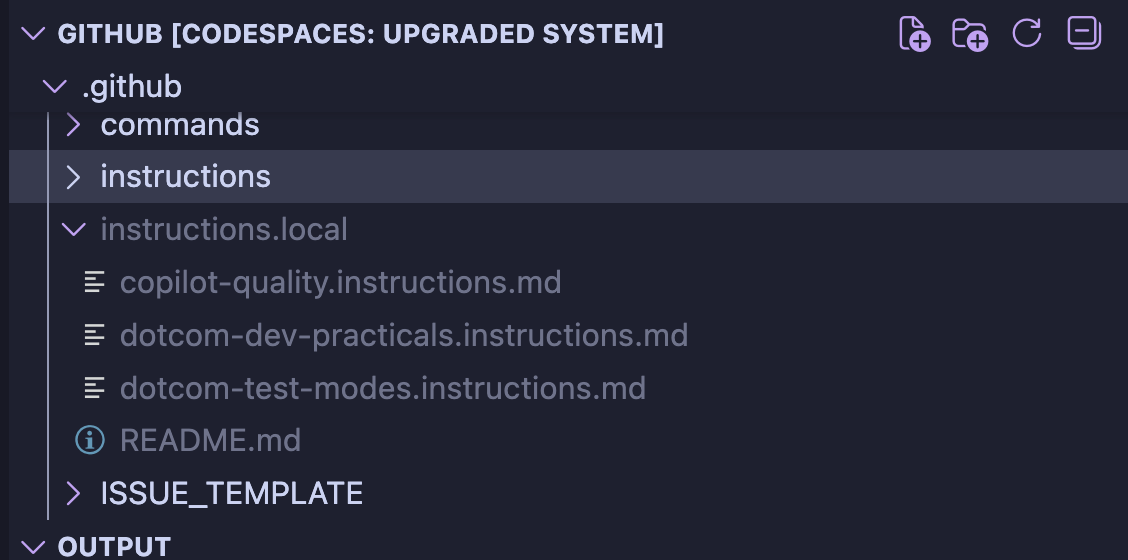
Dotfiles sync
I work in a large codebase with a lot of contributors, so I didn’t want to add these personalized instructions to the main branch, but I also didn’t want to copy-paste them into my workspace each time. Dotfiles to the rescue! After creating a repository with the instructions file, I edited my sync script to automatically copy the files into a .github/instructions.local folder. This means they are untracked by default, but right next to the main instructions folder where I can easily move to if I want to include them in a session.
The Impact (So Far)
I haven’t rigorously tested all the changes or quantified the impact, but I feel noticeably more productive and definitely less annoyed since adding and automating these instructions.
The biggest difference maker so far has been the Session Ledger requirement. It provides a feeling similar to walking away from the computer and coming back with a fresh brain, but without losing ground from where I ended. Context tracking in markdown for re-prompting in new windows has been a good way to make sure the iteration stays on track.
What’s Next
I’m planning on:
- Testing combinations of instruction files to see which ones play well together
- Creating problem-specific metadata files for my next work area with:
- Code references
- Flamegraphs, error traces, logs
- Links to prior PRs for richer context
- Expanding dotfiles support to other repositories and syncing changes back to the source repository
- Continuing to iterate on these as new patterns emerge
Lessons Learned
Don’t Wait So Long to Improve the Process
My advice to past-me: Small tweaks can make a huge difference. Once you have an instructions file in your workspace, you can make adjustments and re-commit them to the source as you go.
Your Pain Points Are Unique (And That’s Okay!)
My major pain points might not be the same as yours, and they’ll probably change over time. The good news? Creating these instructions files is quick and cheap. The time and energy investment in initial creation and continuous improvement is very low.
Automation Makes It a No-Brainer
Once instructions are automatically added through dotfiles setup, they become a no-brainer addition to the workflow. No copy-pasting from notes into each codespace.
I Should’ve Done This Sooner
Don’t be like me and suffer through days of frustration before fixing the process.
I hope this helps to improve your life and code! If you have any suggestions or thoughts, please reach out.